



If changing your opening hours feels like performing surgery on your website, something is wrong.
Many small business owners log in to make one simple update and find a dashboard full of warnings, plugins, settings, and buttons they are scared to press. That is not a sign that they need more technical training. It is often a sign that the content management system was not chosen with the people using it in mind.
The quick read
Choosing a CMS: key takeaways
- A CMS is the software you use to update your website without writing code.
- More features do not always make a CMS more useful or easier to manage.
- The right setup should match the content your business actually updates.
- A headless CMS keeps content separate from the website design, making it easier to reuse later.
- We use Sanity when a tailored editing experience is a better fit than an off-the-shelf system.
What does a CMS do?
CMS stands for content management system. It is the software behind a website that lets you update content without asking a developer to change the code.
Depending on the business, that might include:
- Changing text and images
- Publishing articles
- Updating services or products
- Adding team members
- Managing testimonials or case studies
A good CMS gives people enough control to keep the website current while protecting the parts they should not have to think about. The experience should feel more like filling in a clear form than rebuilding a web page.
The three common approaches
Most small business websites use one of three broad approaches.
Website builders
Products such as Squarespace and Wix combine the website and editing tools in one service. They can be a practical choice for a straightforward website, especially when speed and a low initial cost matter more than custom behaviour.
The trade-off is that the business works within the layouts, features, and integrations the platform provides. Moving to a different system later can require rebuilding more of the site.
Traditional CMSs
A traditional CMS such as WordPress usually manages the content and assembles the website in the same system. It can support anything from a simple brochure site to a large publishing platform.
That flexibility is valuable, but a heavily customised site can collect themes, plugins, settings, and overlapping editing tools over time. The question is not whether the CMS has enough features. It is whether your team can understand and maintain the particular setup you are buying.
Headless CMSs
A headless CMS stores and organises content separately from the website that displays it. Developers build the customer-facing site, while editors use a dedicated content workspace.
This approach takes more care to set up, so it is not automatically the cheapest option. Its strength is flexibility: the website can be highly tailored, and the same organised content can be used in another website, an app, or a future redesign.
What does headless CMS mean?
The name sounds more technical than the idea.
Imagine your content as a well-organised library. Your service descriptions, staff profiles, articles, and images live on labelled shelves. The website borrows what it needs and decides how to present it.
In a traditional CMS, the library and the presentation are often part of the same building. In a headless CMS, they are separate but connected.
That separation can make future changes easier. If the website is redesigned in a few years, the organised content does not need to be copied out of old page layouts and written again. It can be connected to the new design.
Headless does not mean hands-off. A poor setup can still be confusing. The benefit comes from designing the editing experience around the business rather than simply installing the technology.
Why we use Sanity
For bespoke business websites, we often build the content workspace with Sanity. Sanity gives us a clean starting point, so we can decide exactly what an editor should see.
If a business only needs to manage articles, services, staff, and testimonials, those can be the main options. Editors do not need to work around unrelated plugin screens or settings that only a developer should change.
We can also add useful guidance to fields, set sensible limits, and define relationships between content. That reduces uncertainty when someone publishes an update and makes it easier to train a new staff member later. They learn a system shaped around the business, not every possible feature of a general-purpose platform.
The goal is not to give the client fewer capabilities. It is to give them the right capabilities in a clearer form.
A real example: L.A. Chocolate Academy
We used Sanity when building the website for chocolatier and educator Luis Amado. The content setup focuses on the material his business actually manages rather than exposing every possible website setting.
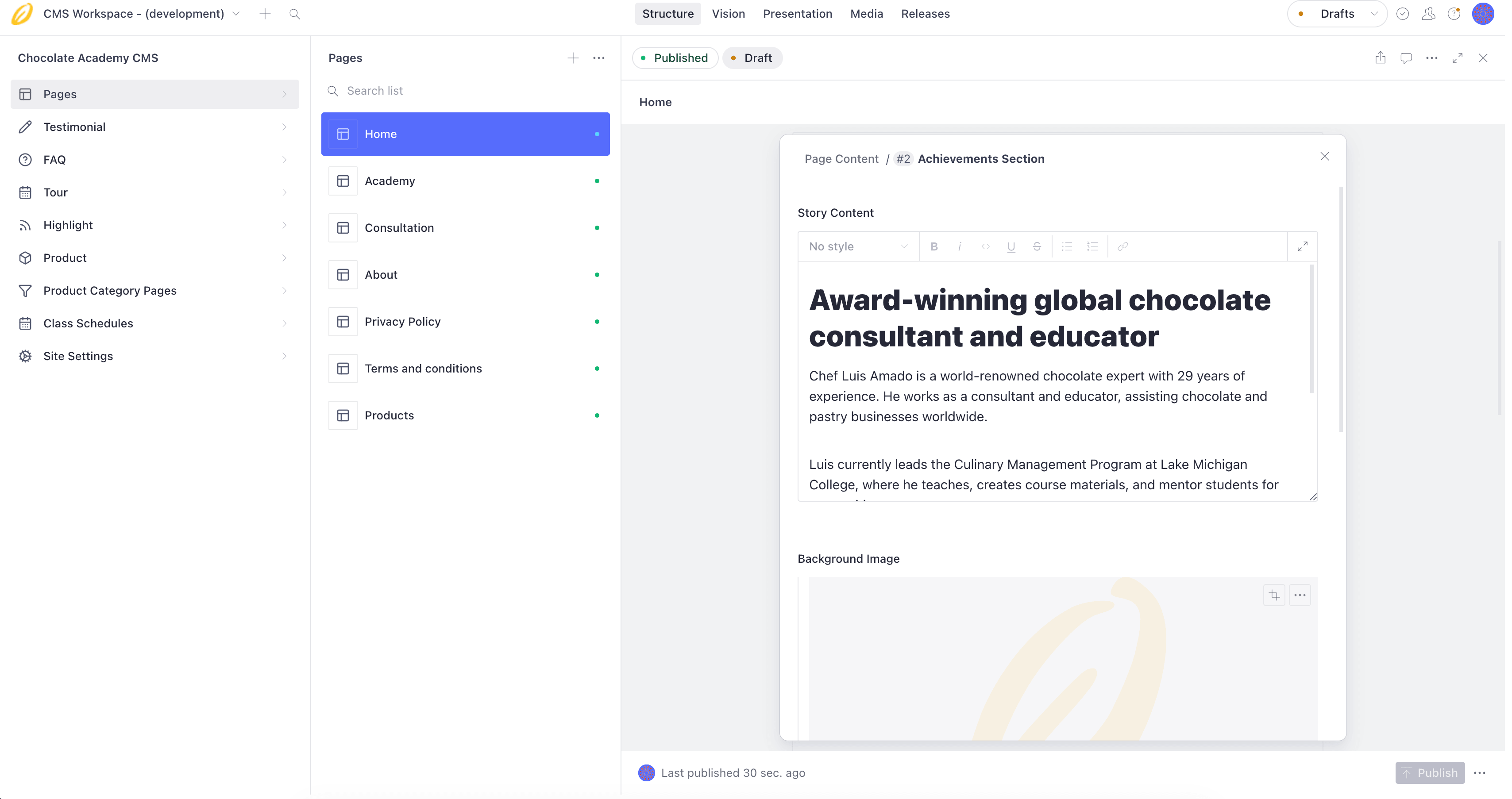
The editing experience we built for Luis Amado presents the content he actually needs to manage, with the rest of the website safely out of the way.
That means the digital experience can remain distinctive while routine updates stay straightforward. The CMS also sits alongside the academy's other systems instead of trying to make one tool do every job.
See how the L.A. Chocolate Academy website supports content, education, and enrolment.
Is WordPress a bad choice?
No. WordPress can be a sensible choice for a standard website, especially when an established theme or plugin already solves the business's needs. It has a large ecosystem and many people know how to work with it.
Problems usually appear when a low-cost starting point is treated as a promise of low cost forever. Plugins accumulate, different developers make changes, and the editing experience becomes harder to understand. Updates, licences, compatibility checks, and maintenance all need an owner.
The same is true of any platform: the right choice depends on the website you need, the people who will manage it, and what is likely to change.
Questions to ask before you choose
Before comparing product names, ask:
- Who will update the website now, and who might do it next year?
- What content will they change regularly?
- Which parts should remain locked down to prevent accidental changes?
- Does the website need custom features or connections to other business systems?
- Will the content need to appear somewhere else in the future?
- Who will maintain the CMS, integrations, and updates after launch?
Ask to see the actual editing experience, not only the public website. Try a few everyday tasks: change an opening time, publish an article, replace an image, and add a team member. A short test often reveals more than a long feature comparison.
The best CMS is not the one with the longest feature list. It is the one that lets your business keep its website useful without making every update feel risky.