



OpenAI recently added WebMCP support to ChatGPT through a feature called site tools. That release gave us a good reason to explain WebMCP in plain English and build a working example.
WebMCP lets a website describe useful actions as structured tools that an AI agent can call. A customer can still use the normal buttons, forms, and menus. In a compatible browser, the agent gets a clearer path to the same functions.
That changes a basic part of website design. Businesses have spent years making pages easy for people and search engines to read. They must now consider whether an AI agent can complete a task on the customer’s behalf.
Try our live WebMCP solar planner demo. It shows how a customer or an AI agent can compare solar packages, estimate savings, and prepare a quote draft on the same page.
The quick read
WebMCP key takeaways
- WebMCP lets a page expose structured actions that a compatible AI agent can discover and use.
- ChatGPT supports WebMCP through site tools in its built-in browser. Chrome also provides experimental tools for development and testing.
- WebMCP is a proposal, not a finished web standard. It should be a progressive enhancement that keeps the normal website working.
- A useful pilot often starts with two or three existing actions, such as search, comparison, availability, or quote preparation.
What is WebMCP?
WebMCP is a proposed web standard that lets a web page offer JavaScript-based tools to AI agents. Each tool has a name, a clear description, a structured input schema, and an action that the page can run.
The current API uses document.modelContext. A page can register a tool such as search_products, compare_plans, or prepare_quote. An agent can discover the tool, supply valid inputs, run it, and inspect the result.
The normal website remains in place. WebMCP works as a progressive enhancement. A person can click through the interface. An agent can use a structured route when the browser supports it.
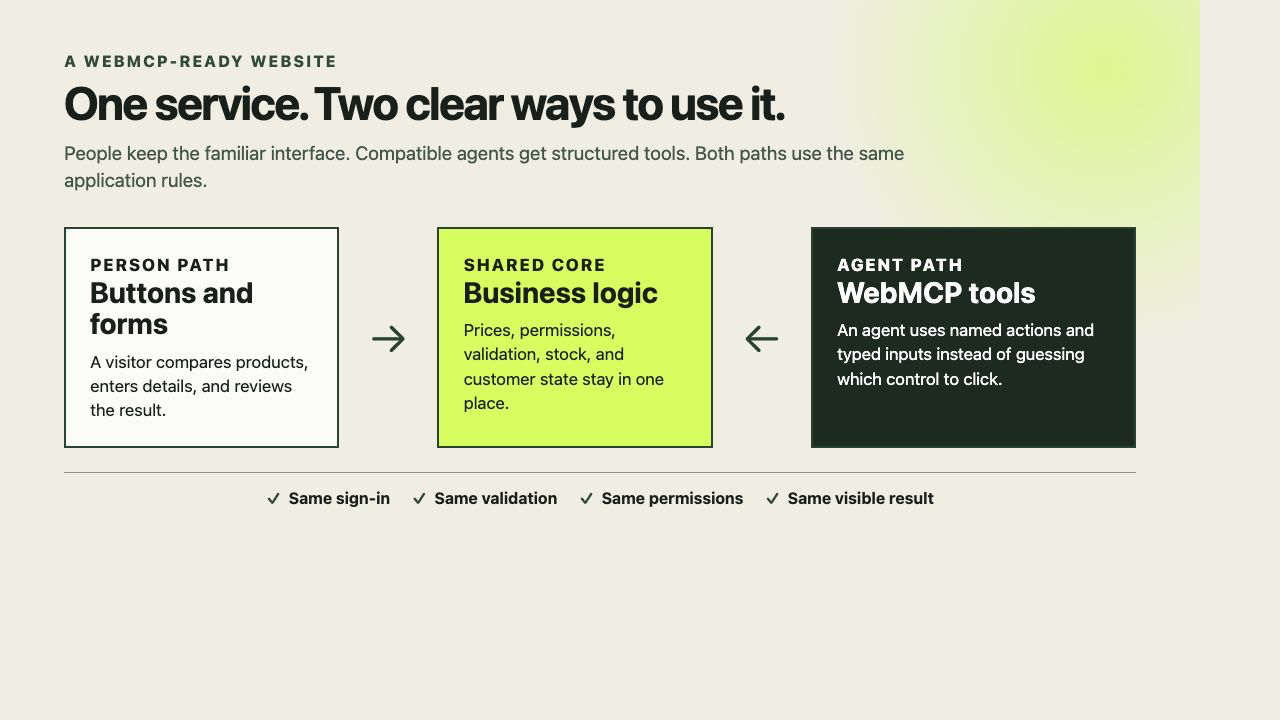
A WebMCP-ready website keeps the normal interface. The person path and the agent path should use the same sign-in, validation, permissions, and business rules.
The WebMCP specification is published by the W3C Web Machine Learning Community Group. The specification states that it is not a W3C Standard and is not on the W3C Standards Track. Businesses should treat it as an active proposal, not a finished standard.
What did OpenAI add to ChatGPT?
OpenAI calls its WebMCP implementation site tools. In the ChatGPT desktop app’s built-in browser, ChatGPT Work and Codex can discover tools from the page that is open. The person and the agent share the same page and signed-in session.
This is different from asking an agent to inspect pixels and guess which button to click. The website can state that a tool called prepare_solar_quote accepts a package name, monthly energy use, first name, and postcode. The agent does not need to infer the form structure from the screen.
OpenAI’s current guidance says to use GPT-5.6 Sol or GPT-5.6 Terra for site tools. GPT-5.6 Luna has WebMCP disabled at the time of writing. Users also need the latest ChatGPT desktop app and access to the rollout. Site tools are not currently available in Enterprise or Edu workspaces. Check OpenAI’s site tools documentation before you test because availability can change.
OpenAI is also using WebMCP inside its own workflows. In one recent example, an OpenAI engineer described how Codex uses browser-side tools in Runme notebooks. WebMCP lets the static client-side app expose notebook actions without adding a server only for an MCP endpoint. The OpenAI case study is a useful example of the pattern.
Is WebMCP limited to ChatGPT site tools?
No. Site tools are ChatGPT’s current implementation of the WebMCP proposal. They are one way to use a WebMCP-ready website, not the definition of WebMCP itself.
The tools belong to the page that registers them. A compatible client can discover them when it visits that page. Current routes include:
- ChatGPT site tools: ChatGPT Work or Codex can use the tools in the built-in browser in the ChatGPT desktop app.
- Chrome development and testing: Developers can use Chrome’s WebMCP experiment and the Model Context Tool Inspector to view registrations, check schemas, call tools, and inspect results.
- An agent inside the website: The current specification includes
getTools()andexecuteTool()for JavaScript-based agents that run in a page or permitted iframe. A business could use this model for its own on-site assistant. - Future compatible browsers and agent products: The proposal is vendor-neutral. Other browser or agent developers can implement it, but support is not universal today.
Support is not automatic. The client must support the proposal, the tool must be available to that client, and the page usually needs to stay open. Authentication, browser permissions, and user confirmation still apply.
An MCP server covers a different situation. It can let an AI application work with a service when no webpage is open. For example, a retailer could offer WebMCP tools for a customer and agent to build a cart together on the live website. It could also offer an MCP server for an approved internal agent to check stock through an API. The website can support both.
How does an agent discover WebMCP tools?
There is no central WebMCP tool directory today. The agent must first reach the page through search, a direct link, an internal link, or a person opening it. A compatible client can then discover the tools registered by that page. This is why SEO and AEO still matter. They help the business and its useful pages get found before WebMCP helps with the action.
WebMCP, MCP, SEO, and AEO are different layers
The names are easy to mix up. Each one solves a different problem.
| Layer | Main job | Simple example |
|---|---|---|
| SEO | Helps search engines crawl, understand, and rank pages | A well-structured page ranks for “commercial solar quote Sydney” |
| AEO | Helps answer engines extract and cite a clear answer | An AI answer cites your explanation of solar payback periods |
| WebMCP | Lets an agent call actions on the open website | The agent compares packages and prepares a quote draft |
| MCP | Connects an AI application to a local or remote server | An internal agent reads CRM records through an MCP server |
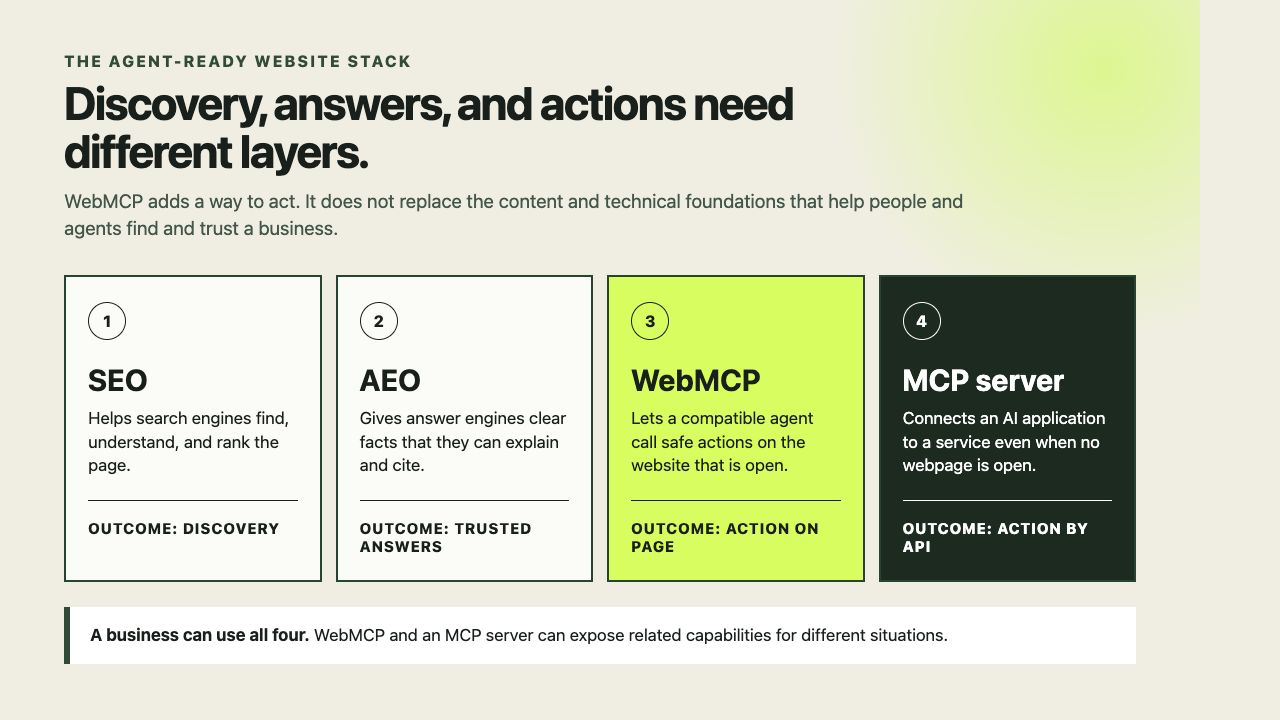
SEO, AEO, WebMCP, and MCP solve different parts of the journey. A business can use all four.
A business still needs strong technical SEO, useful content, structured data, and clear brand signals. WebMCP does not make a weak page rank. It does not guarantee that an answer engine will cite the page.
WebMCP adds an action layer. SEO helps a customer find you. AEO helps an answer engine explain you. WebMCP can help the customer complete the next step.
What problem does WebMCP solve?
AI agents can already operate some websites through browser automation. They inspect the page, find controls, type into fields, and click buttons. This works, but it can be slow and fragile.
A small interface change can move a button or rename a field. A date picker that feels clear to a person may be difficult for an agent. A hidden validation message may cause the agent to repeat the wrong action. The agent may also need a large amount of page content to work out what the interface can do.
WebMCP gives the agent an explicit contract:
- The tool name states the action.
- The description explains when to use it and what it changes.
- A JSON Schema defines allowed inputs.
- The execution code calls the website’s existing business logic.
- The result reports what happened in a form the agent can inspect.
Chrome describes this approach as a way to improve the accuracy of agent actions. It also notes several limits. The agent must visit the page to discover its tools. Complex interfaces can need extra state work. The API focuses on local browser workflows with a person involved. See the current Chrome WebMCP developer guide for implementation and testing details.
A practical example: a solar quote website
Our demo gives people three solar packages. A visitor can set monthly electricity use, compare the options, and prepare a quote draft.
The page also registers three WebMCP tools:
compare_solar_packagesreturns package size, indicative price, expected energy offset, and intended household type.estimate_solar_systemaccepts monthly energy use and returns a recommendation with an indicative saving.prepare_solar_quoteupdates the visible page with a quote draft for the customer to review.
A customer can tell ChatGPT:
Compare the options for a home that uses 820 kWh each month, then prepare the best value quote for Sam in postcode 2000.
The agent can call the two read tools first. It can then call the write tool with the selected package. The result appears in the same planner that the customer can see.
Our public demo does not send the quote anywhere. The draft stays in the page. This keeps the example safe while showing the full pattern. A production version could call an existing quote API after normal authentication, server-side validation, consent, and abuse controls.
Other WebMCP examples for businesses
Ecommerce and retail
An online retailer can expose tools to search products, check stock, compare variants, add an item to a cart, and prepare checkout.
A customer could ask an agent to find a waterproof hiking jacket under $300, confirm that a medium is available, and add the best two options to the cart. The agent gets typed filters and product results instead of scraping a grid of cards.
The final purchase should keep the same payment checks and customer confirmation as the normal checkout.
Travel and hospitality
A hotel or tour operator can expose room search, date availability, accessibility filters, itinerary updates, and booking preparation.
An agent could compare family rooms for two dates, exclude options without step-free access, and prepare a booking for review. A good tool response would include the room, dates, rate rules, taxes, and cancellation terms.
Professional services
An accountant, law firm, agency, or consultant can expose service matching, appointment availability, document checklists, fee estimates, and enquiry preparation.
An agent could match a new business owner to the correct consultation, find an available time, and prepare the enquiry. The tool must avoid presenting an estimate as final professional advice.
SaaS products and customer portals
A software company can expose dashboard filters, report exports, account searches, draft changes, and support diagnostics.
For example, an agent could set a reporting date range, read the data behind a chart, find an unusual change, and prepare a note for the analyst. This is one of the strongest early use cases because the agent and the person need to inspect the same live state.
Real estate and property services
A property website can expose listing search, inspection times, saved shortlists, mortgage estimate inputs, and enquiry drafts.
The agent could find two-bedroom apartments near a train station, remove listings outside a set strata budget, and prepare an inspection list. The page can return exact listing data and clear availability instead of making the agent extract details from card layouts.
Education and training
A learning platform can expose course search, prerequisite checks, timetable comparisons, progress summaries, and enrolment preparation.
An agent could compare two courses against a learner’s available time and show where prerequisites are missing. High-impact decisions, payments, and formal enrolment should stay subject to normal user review.
What does a WebMCP implementation look like?
The imperative API registers tools in JavaScript. This simplified example follows the current document.modelContext shape:
if (typeof document.modelContext?.registerTool === "function") {
  await document.modelContext.registerTool({
    name: "estimate_solar_system",
    description:
      "Recommend a solar package from average monthly energy use.",
    inputSchema: {
      type: "object",
      properties: {
        monthlyEnergyUseKwh: {
          type: "number",
          minimum: 350,
          maximum: 1600
        }
      },
      required: ["monthlyEnergyUseKwh"],
      additionalProperties: false
    },
    annotations: { readOnlyHint: true },
    execute: async ({ monthlyEnergyUseKwh }) => {
      return calculateSolarRecommendation(monthlyEnergyUseKwh);
    }
  });
}
The browser support check is essential. It keeps the website working when document.modelContext is absent.
WebMCP also has a declarative approach for standard HTML forms. The current formal specification still marks parts of declarative WebMCP as unfinished and points implementers to its explainer. For a production pilot, check the latest specification and browser documentation before you choose an approach.
A sound implementation should reuse existing application logic. Do not create a second, weaker path that skips authentication or validation. The website should apply the same permission checks whether a person clicks a button or an agent calls a tool.
Security needs to be part of the tool design
WebMCP tools run inside a live, signed-in page. That is useful because the website already knows the user and current state. It also means a poorly designed tool can carry real risk.
The WebMCP specification discusses tool poisoning, misleading descriptions, unsafe output, and differences between the normal interface and the tool path. OpenAI also treats website tool definitions and results as untrusted content. Its browser reviews each tool invocation, but that review does not make a website trustworthy.
Use these controls in a production implementation:
- Keep each tool narrow and give it one clear job.
- Validate all inputs on the server, even when the browser validates them first.
- Reuse the current authentication and authorisation rules.
- State side effects in the tool description.
- Mark read-only tools correctly.
- Require user confirmation for purchases, messages, deletion, permission changes, or other high-impact actions.
- Return enough detail for the person and agent to verify the result.
- Treat tool output and user-generated content as untrusted data.
- Log tool calls without storing more personal data than the business needs.
- Test tool descriptions for ambiguity and test the actions for abuse.
Tool descriptions are part of the product and security surface. “Finalise cart” is unclear if it charges the customer. “Purchase the current cart after the customer confirms the total” states the effect.
How can you test WebMCP now?
WebMCP is not available in every normal browser session.
For the OpenAI path:
- Install the latest ChatGPT desktop app.
- Open the built-in browser in the app.
- Use GPT-5.6 Sol or GPT-5.6 Terra.
- Open a website that provides site tools.
- Select Site tools in the address bar to inspect the available tools.
- Ask ChatGPT Work or Codex to complete a task on the page.
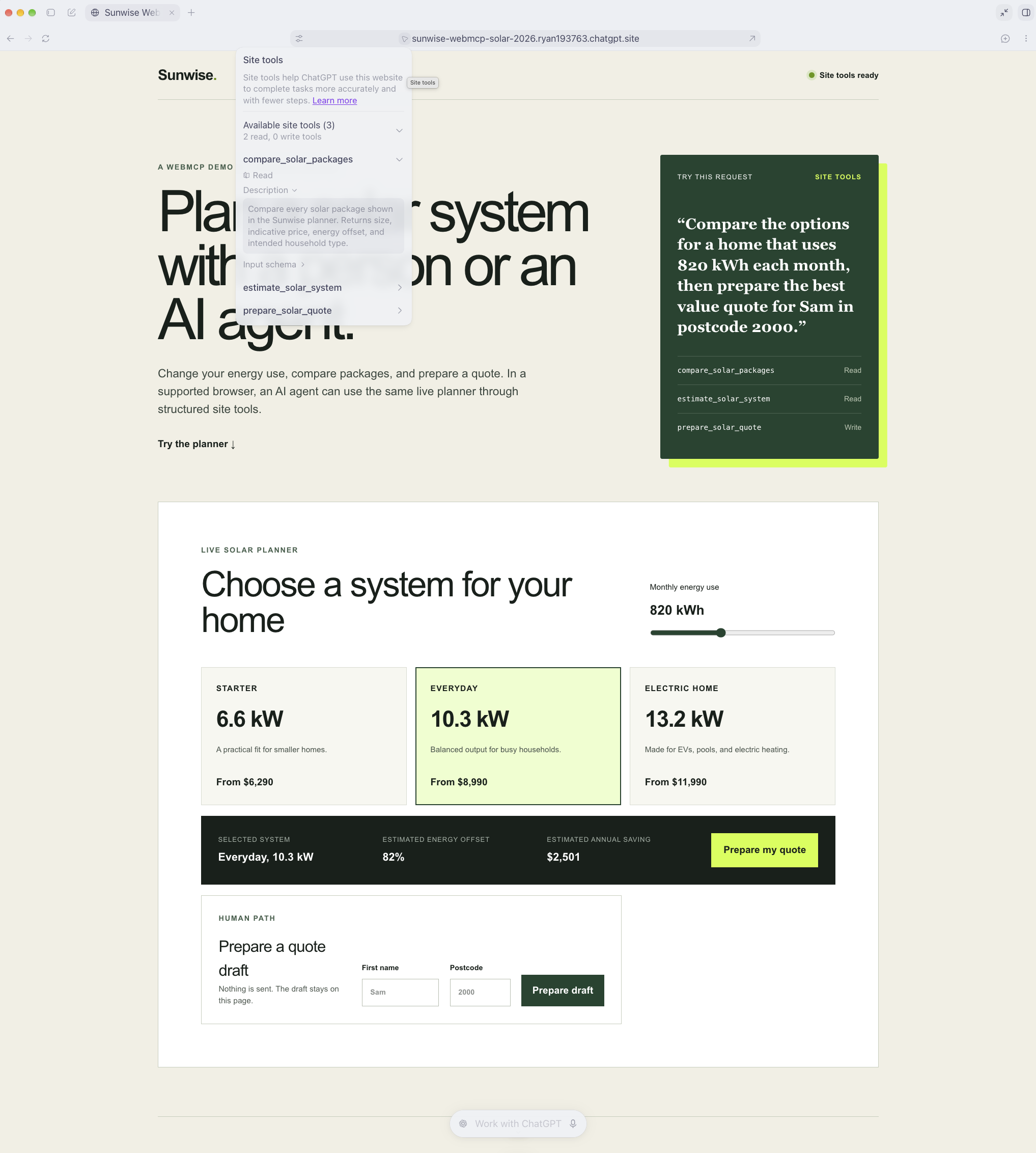
Open Site tools in the browser address bar, then select Available site tools. This screenshot shows the tools registered by our Sunwise WebMCP solar planner demo.
For Chrome development, Google currently offers an origin trial from Chrome 149. Local developers can also enable chrome://flags/#enable-webmcp-testing and relaunch Chrome. Chrome provides a Model Context Tool Inspector extension for viewing registrations, calling tools, checking schemas, and inspecting results.
Chrome also requires an origin-isolated document. The tools Permissions Policy defaults to self, which permits top-level and same-origin registration and blocks cross-origin iframes. A cross-origin iframe needs allow="tools".
These details can change while the proposal develops. Use the official WebMCP specification, Chrome guide, and OpenAI site tools guide as your current references.
Should a business adopt WebMCP now?
A small pilot makes sense when customers already complete structured tasks on your website and an agent could reduce several steps.
Good pilot actions include product search, plan comparison, availability checks, dashboard filters, quote estimates, and draft preparation. They are easy to review and usually use business logic that already exists.
Do not rebuild the whole website around an unfinished proposal. Add WebMCP as a progressive enhancement. Keep the normal interface. Put tool code behind a support check. Start with two or three useful actions. Measure success before you add more.
A pilot with two or three tools is normally an enhancement, not a website rebuild. The effort depends on whether the existing actions already have reusable APIs, authentication, validation, and clear permission rules.
Useful measures include:
- Successful task completion rate.
- Tool selection accuracy.
- Validation and execution error rate.
- Time and steps needed to complete the task.
- Customer confirmation or abandonment rate.
- Support requests caused by unclear results.
- Conversion quality and volume.
There is no verified evidence that adding WebMCP improves Google rankings. Adopt it to make valuable tasks easier and more reliable for compatible agents. Keep investing in SEO and AEO for discovery and citation.
Why agent-ready websites matter
People are starting to delegate research and routine actions to AI assistants. A website designed only for manual clicks can still work, but the agent must spend more effort understanding the interface.
An agent-ready website presents clear content, structured facts, accessible controls, stable business logic, and safe callable actions. It gives a customer more ways to use the service without removing the normal interface.
This has a practical commercial effect. A business may rank for a relevant query and still lose the next step if an agent cannot check availability, compare the correct options, or prepare an enquiry. Discovery gets the business considered. Clear answers build trust. Safe actions help the customer move forward.
How Fireplace Digital can help
Fireplace Digital can help a business move from an informative website to an agent-ready website without discarding the work that already performs well.
1. Find the right agent use cases
We review customer journeys, search intent, website analytics, support questions, and existing APIs. We identify the few actions where an agent can remove real effort. We do not begin with a long tool list.
2. Improve the SEO and AEO foundation
We organise content around clear customer questions. We improve page structure, internal links, technical crawlability, entity signals, structured data, and answer-first sections. This gives search engines and answer engines better material to understand and cite.
3. Design the WebMCP tool contract
We define tool names, descriptions, input schemas, results, side effects, and confirmation points. We connect each tool to a real user need and an existing website function.
4. Build the progressive enhancement
We add WebMCP support to the current website where practical. The normal website keeps working for people and unsupported browsers. We reuse current authentication, permissions, validation, and business rules.
5. Test safety and task quality
We test whether agents choose the correct tool, supply valid inputs, report results accurately, and stop at the right confirmation point. We also test failure states, signed-out states, permission limits, and malicious inputs.
6. Measure and improve
We track task completion, errors, customer review, conversion quality, and support impact. We update the tools as browsers, agents, and the proposal change.
Fireplace Digital combines website strategy, UX, development, SEO, AEO, and AI implementation. Agent readiness depends on clear content, sound business rules, careful security, useful customer journeys, and correct code.
See WebMCP in action
Start with the Sunwise WebMCP solar planner. The demo keeps all quote details inside the page, so you can compare the person path and the agent path without submitting personal data.